Actors
Create commercial actors and link them to dealers.
Create commercial actors (employees, external, coordinators…) and link them to one or more dealers.
Search for actors
Filter by Code, Name, Type, or Email. Clear filters removes all active filters at once.
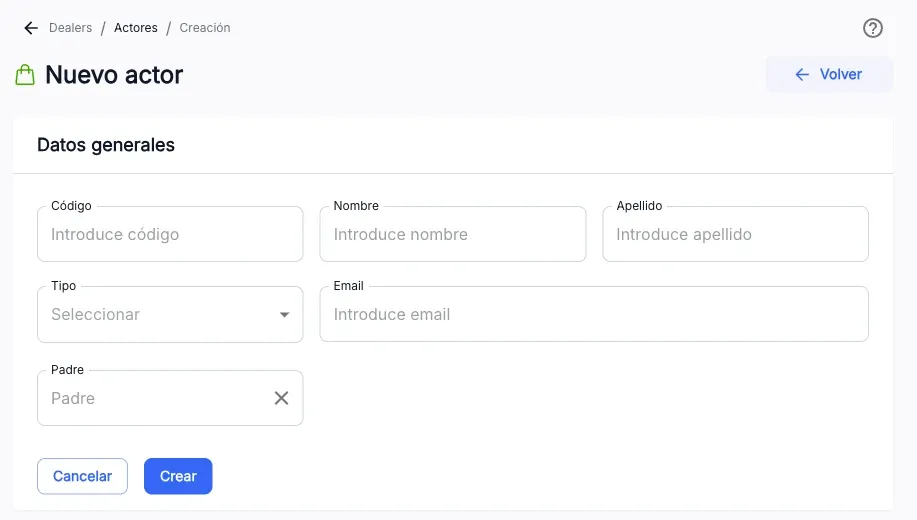
Create an actor
- Press Create.
- Fill in Code, Name, Surname, Type, Email, and, if it applies, Parent.
- Press Create.
Edit an actor
From a row’s ⋮ menu, Edit opens the same form with the actor’s data to modify it.
Link dealers to an actor
On an actor’s detail page, the Dealers tab: Add dealer links one or more existing dealers; select rows and use Unlink dealer to remove the link.
Delete an actor
From a row’s ⋮ menu, Delete asks for confirmation with the actor’s name and code before deleting it.
The screenshots show the Admin interface in Spanish.
When something is not as expected
| You see | What it means and what to do |
|---|---|
| Create is not available | You lack write permission on this section. |
| ”The actor code already exists” | The code you entered is already in use; choose another one. |
Reference
Actor types
Coordinator, Employee, External, Trainer, GPV external, GPV internal, Head, KAM, Manager, National, Supervisor, Territorial.